Berdasarkan hasil pencarian model kartu nama yang ada di mbah google, penulis mencoba untuk ATM (Amati - Tiru dan Modifikasi) pada kesempatan ini akan mencoba desain kartu nama menggunakan corel draw, adapun langkah-langkahnya sebagai berikut :

1. Buat dahulu kotak persegi dengan ukuran 9 x 5,5 seperti pada gambar berikut


1. Buat dahulu kotak persegi dengan ukuran 9 x 5,5 seperti pada gambar berikut

2. Beri warna biru dengan cara klik object kemudian klik pilihan warna yang ada di samping kanan.

3. Setelah kotak persegi terisi warna, klik tranparency tool yang berada di sebelah kiri, kemudian drag dari arah atas ke arah bawah, kemudian atur jarak tranparency-nya, seperti gambar di bawah ini

4. Buatkan garis baru dengan menggunakan freehand atau bezier, seperti gambar di bawah ini :

5. Lengkung garis yang tadi dibuat dengan menggunakan shape tool, seperti gambar dibawah ini

6. Kemudian isi warna object yang sudah di lengkungkang dan tambahkan tranparecy tool seperti pada langkah ke 3.

7. Buat dua buah garis, kemudian berwarna dengan cara klik garis dan klik kanan di pilihan warna dan pertebal garis dengan cara klik garisnya kemudian perhatihan di properties bar ukuran untuk mempertebal garis seperti gambar dibawah ini.

8. Lengkungkan dua buah garis dengan menggunakan shape tool, seperti pada langkah 5 (lima) kemudian tambahkan tranparency tool seperti pada langkah ke 6 (enam) satu persatu seperti pada gambar di bawah ini.

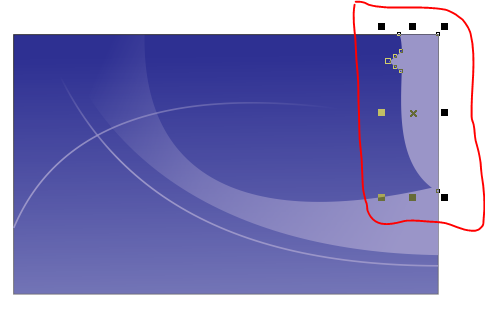
9. Tambahkan object seperti berikut, dengan cara buatkan garis kemudian lengkungkan pada bagian garis yang harus di lengkungkan, seperti gambar dibawah ini
10. Masukkan karakter object icon telepon, email dengan cara klik menu text kemudian klik insert character, kemudian kemudian wingdings pada pilihan insert character, apabila sudah ada character yang diinginkan klik and drag pada area pilihan character ke area drawing page, seperti pada gambar berikut.

11. Kemudian ketikan huruf dengan menggunakan text tool dengan cara klik text tool kemudian klik di area drawing page, dan atur ukuran huruf dan jenis hurufnya di bagian properties bar seperti gambar di bawah ini.

12. Untuk Tulisan ASOL agar huruf S-nya bisa berubah caranya klik tulisan ASOL kemudian tekan tombol ctrl + K berfungsi untuk memisahkan huruf menjadi per-character atau menjadi satu huruf satu huruf kemudian miringkan dengan cara klik sekali dan klik sekali lagi sampai muncul panah yang mengarah dua arah seperti gambar dibawah ini.

Selesai Deh ... demikian langkah-langkah untuk membuat kartu nama.